PLUG-INS / BLENDER
MATERIALHAUS for Blender
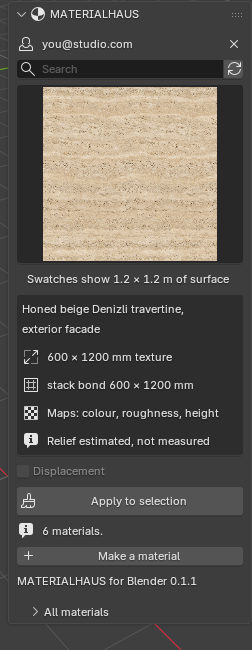
Your MATERIALHAUS library in Blender’s sidebar. Select objects, click a material, and it goes on at the size it measures in the world, on every face.
- Status
- Beta
- Version
- 0.1.1
- Supports
- Blender 5.2
- System
- Windows
WHAT IT DOES
- 01
A MATERIALHAUS tab in the 3D Viewport’s sidebar, with every material as a swatch of the same 1.2 m of surface, so sizes compare at a glance.
- 02
Select objects and click Apply: a Principled BSDF material with its colour, roughness and metalness maps.
- 03
The texture arrives at its real-world size on every face — walls, floors, any orientation — and never mirrored. The scene’s unit scale is respected.
- 04
Relief at the depth the material states; displacement in Cycles when you ask for it. A material that states no depth gets no invented relief.
- 05
Apply the same material twice and the one in the file is reused, in one undo step. Objects with unapplied scale are pointed out, with a button to apply it.
- Download the .zip file.
- Drag it onto Blender, or Edit ▸ Preferences ▸ Get Extensions ▸ Install from Disk.
- In the 3D Viewport press N (with the mouse over it) and open the MATERIALHAUS tab.
- Sign in once. Your browser opens; use Google or email, whichever you use on MATERIALHAUS.
GOOD TO KNOW
Said plainly
- Run inside Blender 5.2 on Windows. Other releases and macOS have not been tried yet, so they are not listed.
- Blender has no real-world map size, so the add-on builds the coordinates in a node group named “MATERIALHAUS real-world” from each object’s own axes. Apply an object’s scale (the panel offers it) for the size to be exact.
- Relief made by MATERIALHAUS is estimated from the colour, not measured; the panel says which. The website’s editor inside Blender is not in this version.
- Blender asks add-ons to be GPL-compatible, so this add-on’s code is GPL-3.0-or-later. Your materials, your account and the MATERIALHAUS service are not affected by that licence.
- The add-on talks only to materialhaus.com. Nothing about your scene leaves your computer, and there is no usage tracking.
Working in other software as well?
SketchUp is a trademark of Trimble Inc. Autodesk, Revit and 3ds Max are trademarks of Autodesk, Inc. Corona is a trademark of Chaos. Blender is a trademark of the Blender Foundation. MATERIALHAUS is not affiliated with or endorsed by any of these organisations.